Hamiltonian Path Puzzles
Last year, I came across an advert for the reMarkable Paper Pro Move (an e-ink tablet). Unfortunately, I have a very unhealthy relationship with shiny gadgets… I convinced myself that an e-reader with good note-taking support is an essential tool for any software engineer (for technical books etc). In fairness, I have got quite a bit of use out of it; I’m writing the first draft of this blog post on it, for example.
One of my favourite uses for the tablet is solving sudoku puzzles - you don’t need to fight with the restrictive UI of sudoku apps, but you retain undo/redo and a perfect eraser. But I wanted a bit more variety. Crosswords? I’m dyslexic, and hate them with a passion. Maybe mazes? I’ve generally found them a little boring, but something maze-adjacent would be good.
One puzzle I really enjoyed (on my first ever shiny gadget: the Game Boy Advance SP) was the icy floor puzzles in 2003’s Pokémon Ruby.
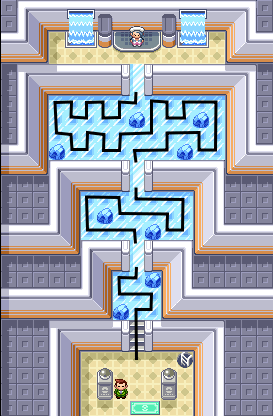
In these puzzles, in order to progress to the next room, you need to first walk on every single tile. If you walk on the same tile twice, the ice breaks and you fall through the floor! You need to find the Hamiltonian path.
Hidato
It turns out there already exists a popular pen-and-paper Hamiltonian path puzzle: Hidato/Hidoku, invented by Dr Gyora M. Benedek around 2005 (who was apparently inspired by scuba diving… and not Pokémon).
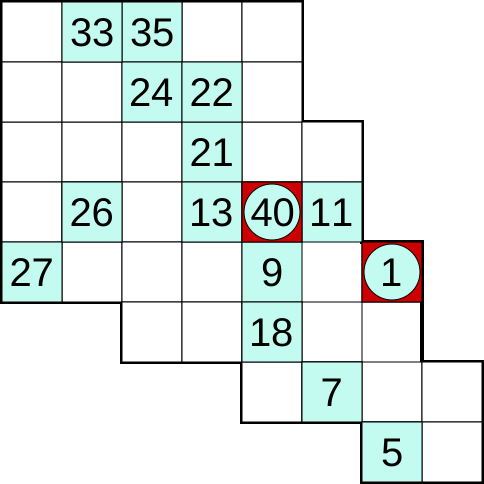

Hidato is played on a sudoku-like grid of numbers. Some cells are filled in from the start, functioning as ‘gates’, which you have to visit in order. You draw your path by writing numbers into the empty cells as you traverse the grid. I appreciated the additional dimension the ‘gates’ gave the puzzles, but filling in numbers to denote your path feels inefficient, and less readable than a simple line.
Looking for an excuse to use Ruby for something, and being aware of the great PDF publishing gem Prawn, I decided to have a go at generating some similar puzzles.
Generation
As performance was of little concern given the use case (static generation of pen-and-paper puzzles), and I’m trying to practise ‘REPL Driven Development’ via Pry, I immediately got started implementing the very first design that popped into my head: I would randomly traverse a grid-like graph, producing at least one valid solution, and then work backwards, hiding parts of the path to produce the puzzle.
def randomly_traverse grid
  x = rand(grid.rows)
  y = rand(grid.cols)
  visited_count = 0
  loop do
    grid[x, y] = visited_count
    visited_count += 1
    neighbors = [[x - 1, y], [x + 1, y], [x, y - 1], [x, y + 1]].shuffle
    x, y = neighbors.find { |n| grid[*n] == :unvisited } || break
  end
  {
    grid: grid,
    sink: visited_count - 1
  }
end
Given a grid (a simple abstraction for a 2D array - returning :out_of_bounds for negative indices etc) with all values initially set to :unvisited, randomly_traverse essentially produces a solved Hidato puzzle by randomly visiting a neighbouring :unvisited node until there are none available.
GATE_FREQUENCY = 5

def format_as_puzzle grid:, sink:
  grid.map_cells do |_x, _y, value|
    case value
    when 0
      :source
    when sink
      :sink
    when :unvisited
      :impassable
    when Integer
      quotient, remainder = value.divmod(GATE_FREQUENCY)
      remainder.zero? ? quotient : :passable
    else
      raise "Unexpected value: #{value.inspect}"
    end
  end
end
format_as_puzzle could then take that path and ‘hide’ the order labels on some of the visited nodes, leaving behind the ‘gates’ (it also switches to symbols, and numbers, that are more sensible for this stage of the generation). With a couple more methods to trim and then render the resulting grid, I already had something that looked like a puzzle!
· · · · ·
7 · · 6 ·
· · · 5 ·
· E ·
4 · ·           S
· · 3 ·     · · ·
· ·   · · · · 1 ·
          2 · · ·
There is one big issue though: the difficulty of the puzzles I’m producing can vary massively, to the point that many are so easy, or short, that they’re trivial to solve.
Quality control
Again, since performance was of little concern, I didn’t bother trying to come up with anything clever, and instead just decided to filter out puzzles that didn’t meet some quality standards.
One attribute of the above puzzle is that there is very little challenge between gates 2 and 3. Three of the four nodes between them only have two arcs each; there isn’t just one correct path to go from 2 to 3, there is only one path, full stop. A better example of the issue is this generation:
            2 · S ·
· 4     · · · ·   ·
· ·     ·     ·   ·
E · · · 3     · 1 ·
Therefore, my first point of QC was to eliminate any puzzle which featured a long chain of degree-two nodes. I also limited the number of degree-two node chains which could feature in a puzzle, relative to the size of that puzzle (a few small chains didn’t detract from the fun for me, and actually sometimes felt rewarding after getting to the end of a tough section).
Another attribute of my puzzles is that they aren’t guaranteed to have a single solution. I don’t see this as being an inherent issue (solution correctness is obvious thanks to using a line instead of numbers), but I thought the number of solutions might be a good indication of difficulty. I filtered out any puzzle that had more than 20 different solutions (this was also practical, so that the neglected performance of my program wouldn’t get in the way).
And lastly, I filtered out puzzles that were just too small.
I now had a list of (hopefully) decent puzzles. I wanted to order them before rendering to a book. For this, I again used solution count as an approximation of difficulty, but this time relative to the size of each puzzle (a large puzzle with more solutions than a small puzzle wouldn’t necessarily be easier). Having tested the end result, I found that while it’s definitely not perfect, the approximation worked out fairly well for an easy-to-hard ordering.
Putting it together
All that was left was rendering. Although I started the project with the intention of getting stuck into Prawn, at this point I just wanted to try out the puzzles: I had AI do it. I described the visual design I wanted, as well as the rough architecture (how we should modularise the puzzle painting so that it could be reused for a watermark on the cover; a separate prompt refactored some graph traversal utilities so they could be reused too). It did a pretty good job right from the start, and I was able to easily get it to refine architectural problems. However, getting it to solve visual issues with the rendering was a lot harder (it struggled to translate the visual changes I wanted into code). Luckily, its code was fairly clean, if a little over the top, and it had extracted some useful constants; I was able to go in and fix things by hand. Overall, the process was still meaningfully faster than if I had implemented all the changes myself.
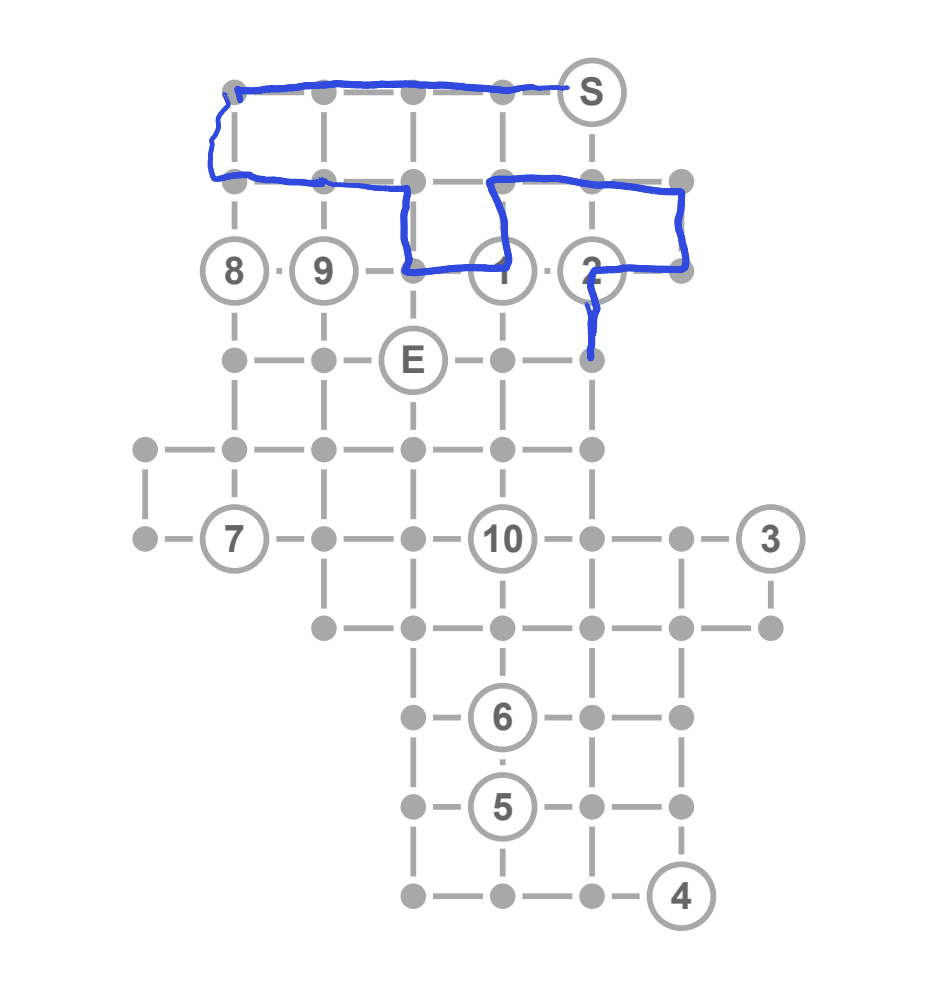
The result was pretty good! And the puzzles were decent enough that even my terminally tech-uninterested fiancée was entertained for a good half hour.
I’d be interested in trying a variable, or random, GATE_FREQUENCY, or seeding the grid with :impassable cells before traversal - or just thinking about the initial generation before writing it 😄 - to see if that makes for better puzzles… but I’m going to solve this set first (on my shiny gadget!)